5. How to get On-Line
If we have whet your appetite, this chapter explains how to actually get on the Internet. We list the equipment you need, explain how best to set it up in a classroom, and describe the costs.
What you need
If you would like to get an Internet connection, you will need the following items:
Computer
Modem
Telephone line
Internet access account
Internet software
We will quickly go through each of these to give you an idea of what's
involved. There is more information available in Appendix B at the end
of the guide.
Computer
There is no need to go out and buy a top-of-the-range multimedia machine
so that you can access the Internet. If you intend confining yourself to
E-mail, then most low-speed computers will be sufficient. However, to use
the Web, it is advisable to use the highest specification computer available
in your school. Anything from a 386 or equivalent should do fine. If your
school uses PCs, Macs, Acorns or Amigas, there is software available although
not all Internet Providers provide the software and support for certain
machines. Check this out with your ISP.
Modem
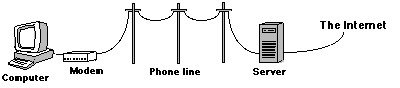
The modem connects your computer to the Internet through a telephone
line. It is a small box which converts computer signals into telephone
signals, changing the message into a form that can be sent down a telephone
line. Then, when the message comes back, the modem changes the telephone
signals back into computer signals, allowing you to read the message on
your screen. There are many types of modems around with various speeds
and capabilities. You should buy the fastest modem your budget will allow.
A 28.8 kbps modem is recommended.
Telephone line
Your modem is connected to an ordinary telephone line. If you use the
main school line to connect to the Internet, the telephone cannot be used
while you are on-line. For this reason, many schools have installed a second
line specifically for Internet use. While this is not necessary, it does
make life much easier in the long run.
Internet access account
There are many Internet Service Providers (ISPs) who provide Internet
access accounts through their network. As well as basic access they also
provide the necessary software and support services. This allows you to
use E-mail, browse the World Wide Web, transfer files, and publish your
own home pages to the Web through the ISP computer (server).
It is important to check that the Internet Service Provider can give
you local access which allows you to connect to the Internet for the price
of a local call. Many area codes now have a local access point (or Point
Of Presence, POP).
When you get access, you choose a username and password. Your username
will be known widely and forms the first part of your E-mail address. Each
time you access the WWW or want to check your E-mail messages you are asked
to login with your username. You are then asked for your password. These
are compared to check if they match the designated username and password
on the ISP server. Your password should not be obvious or related
to the school in any way - it should be unguessable, don't pick the name of the school
saint! Guard the password in the same way you would a bank machine PIN
number. If it gets into the wrong hands, E-mail can be messed around, school
Web pages altered or abusive messages sent to others in the school name.
Internet software
With your modem, you will get software which enables your computer to
work with your modem. When you get an account, your ISP will give you software
which allows you to connect with their server and transfer data over the
phone line. You will also receive an E-mail program and a Web browser.
Other considerations
Location
In your school, you will have to decide where you are going to position
your computer and modem for Internet access. This will largely depend on
where the phone line is situated. If you decide to install a separate phone
line then you should consider carefully where you will position it so as
to cater for all students. If you have a computer lab, then this is the
obvious choice. The library, resource room, or even the staff room should
also be considered. The ideal situation would be a connection to each individual
classroom with the Internet available as a teaching, learning, and reference
tool as the need arises. Some schools already have telephone extensions
to each classroom. Ensure that the location you decide upon can be monitored,
so that it is not freely open to use (or misuse) by students.
Costs
With free Internet access, Internet costs for schools have been greatly
reduced. However, the initial set-up costs of modem and separate phone
line (optional) still exist, as do the phone costs for the time spent on-line.
Unfortunately, schools are using the phone line during peak-rate time.
On-line time should be carefully controlled and given definite limits where
budget constraints exist. Appendix B gives more details regarding telephone
costs.
| Contents Page | Order the Booklet |
 |
To report a problem in the operation of this web site email webmaster@classroom.broadcom.ie |